
understanding your proof
This section explains the different scenarios you might encounter with your proof, what they mean, and the options available to help you choose the best solution before giving your final approval.
1- Change in Size
We’ve adjusted your design to be as close as possible to the size you requested, while keeping everything looking good and in proportion. Sometimes, the final sticker won’t be the exact size you asked for.
For example, if you wanted a 2-inch by 2-inch sticker, but your design is taller, like 2 inches wide and 1.4 inches tall, we would have to squish it or stretch it to make it fit, which wouldn’t look right.
Instead, we adjust the biggest dimension to match your request. In this case, we’d make the height 2 inches, and the width would shrink to 1.4 inches to keep it looking natural.

What are your options? 💡
a) You can redo and resubmit your artwork to fit the desired size.
b) You can ask us to increase the size of your sticker, and we’ll send you an invoice for the price difference.
c) You can stick with the suggested size, and we’ll give you more stickers to make up the difference.
d) You can cancel the order, either partially or fully.
2. Low Resolution File
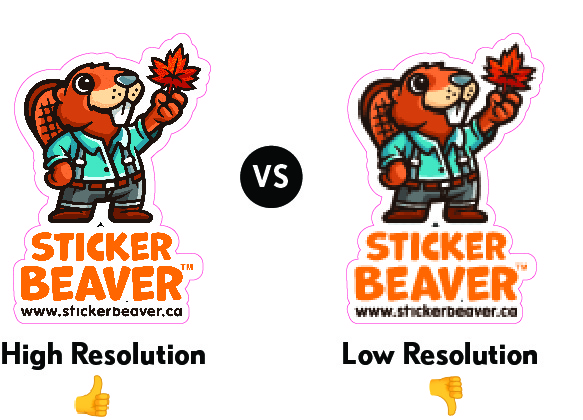
We noticed that the resolution of your file is low. This means that when your stickers are printed, they might look blurry or pixelated because there aren’t enough pixels to create a clear, sharp image/text. The lower the resolution, the less detail will be visible in the printed version.
What are your options? 💡
a) You can resubmit your artwork with a higher resolution file to ensure your stickers print clearly. A good rule of thumb is to make sure the file is created at least 300 DPI (dots per inch). don’t just upscale your file as this won’t improve the resolution
b) You can send a vector file, which is ideal. Vector files (like .AI, .EPS, or .PDF formats) maintain their quality no matter how big or small the design is, so they’re perfect for printing.
c) You can proceed with the low-resolution file, but please note that your stickers may not appear as sharp or detailed as you’d like.
d) You can request to cancel your order, either partially or fully, if you prefer not to move forward with the current file.
3. Small Text
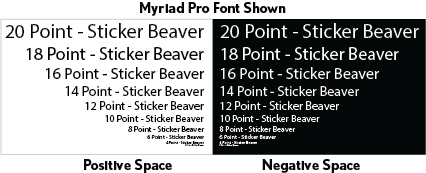
Some of the text in your design is very small, which may cause issues when printed. Depending on the font style, we recommend using a minimum of 8 points for dark text on a light background (positive) and at least 10 points for light text on a dark background (negative).
For standard fonts like Myriad Pro or similar, these minimums generally work well. However, for script, thin-stroke, decorative, or condensed fonts, a larger size may be required to ensure the text prints cleanly and remains legible.
Please note that we cannot guarantee print quality or legibility for text smaller than these recommended sizes. Smaller or thinner text may be hard to read or could appear incomplete, especially on dark backgrounds.
What are your options? 💡
a) You can adjust your text to meet these size recommendations and use a bolder font to improve readability.
b) You can proceed with the current design, but keep in mind that the small text may not be clear or readable once printed.
c) You can request to cancel your order, either partially or fully, if you prefer not to move forward with the current design.
4. Small Design Elements
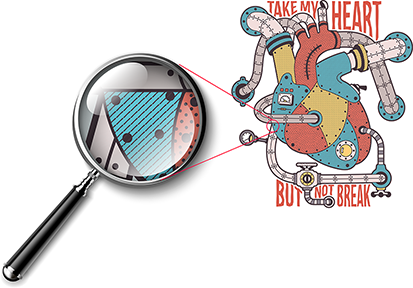
Some of the design elements in your file are very small or thin. When printed, these details might not appear clearly or could even look incomplete, especially on darker backgrounds. Tiny elements, such as fine lines or small shapes, can get lost in the printing process, making them hard to see.
Very thin parallel lines may also appear as a double-strike or doubled line. This can be especially noticeable when printing on clear or metallic materials.
What are your options? 💡
a) You can enlarge or thicken the small design elements to ensure they’re visible when printed at actual size.
b) You can resubmit your artwork with these adjustments, and we’ll provide a new proof.
c) You can proceed with the current design, but please keep in mind that small or thin elements may not print as clearly as they appear on screen and thin parallel lines may show a double-strike effect.
d) You can request to cancel your order, either partially or fully, if you prefer not to move forward with the current design.
5. File Missing Bleed
Your file is missing the required 1/8″ bleed, which is the extra space around your design that ensures no important elements are cut off during printing. Without this bleed, the edges of your design may get too close to the cut line, which can lead to parts of your artwork being accidentally trimmed off.

What are your options? 💡
a) You can resubmit your artwork with the correct bleed. Make sure there is an additional 1/8″ (around 3 mm) of space around your design to avoid issues during cutting.
b) You can proceed without the bleed, but please be aware that your design may get cut too close to the edge.
c) You can request to cancel your order, either partially or fully, if you prefer not to proceed with the current file.
6. Requested No or Thin Border
The space between your design and the cut line (known as the safety margin) is too small. To prevent any important parts of your design from being cut off, we’ve slightly increased the size of the border. This adjustment ensures that the design stays intact during the cutting process.
What are your options? 💡
a) You can approve the adjusted border size to keep all elements of your design safe from being cut off.
b) You can resubmit your artwork with a larger safety margin around the edges.
c) You can proceed with the current design, but be aware that parts of your design may be cut too close to the edge.
d) You can request to cancel your order, either partially or fully, if you prefer not to move forward with the current design.
7. Specific Cut Line Requested
You’ve requested a specific cut line for your design. While we do our best to ensure accuracy, please note that the final cut may vary slightly from the digital proof. Our cutting process has a tolerance of up to 1/16″, meaning the cut line could shift up, down, left, or right by that much.
What are your options? 💡
a) You can approve the current cut line, understanding that a small shift might occur.
b) You can adjust your design to allow for the cutting tolerance and resubmit your file.
c) You can proceed with the current design, but keep in mind there might be slight variations in the cut.
d) You can request to cancel your order, either partially or fully, if you don’t want to move forward with the current design.
8. Colour Conversion
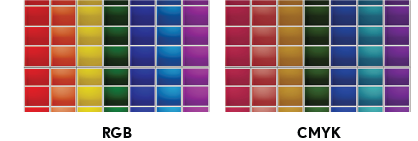
When it comes to how the colours will look in the final print, it’s important to know that the colours on your screen will not exactly match what gets printed. This is because screens (like monitors and phones) use RGB (Red, Green, Blue) to display colours, while printing uses CMYK (Cyan, Magenta, Yellow, Black). Screens are backlit, making colours look brighter, whereas printed colours might appear slightly darker or less vibrant.
What are your options? 💡
a) You can approve the current proof, understanding that the printed colours may look a bit different from what you see on your screen.
b) You can order a small batch first to see how the colours turn out before making a larger order.
c) You can cancel your order, either partially or fully, if getting the exact colour match is critical.